FiFA [2006-2011] Next gen ports via RPCS3 and Xenia

Hi everyone, I hope you're all doing well!

First of all thanks for all your feedback here. I am really appreciate it.
I was able to play FIFA07 with Xenia Canary Version from December 14th 2022 canary_experimental@b0268ab87) on 4K (scale x: 3 and scale y: 3) without any noticeable issues.

Unfortunately I am not able to get UCL06-07 running and I don't understand it. I used Ahmeds config too but even though I am using the core count trick via Task Manager the game crashes once I changing it back and enable CPU 0 to CPU 4. Maybe I am using the wrong Xenia Edge Version?

Which Xenia Edge Version I have to use together with Ahmeds Config File?
 
Hello!
1. What is the best settings for RPCS3 & them-FIFA editions for 8GB laptop?
2. How to fix the UCL 06-07 Xenia graphics?
1.Currently, for emulating FIFA-style football games, using Xenia Edge is a better choice than RPCS3, as it has lower system requirements and fewer graphical bugs.
2.For a dedicated graphics card, it is necessary to set the renderer to Vulkan and the rendering mode to Accuracy.
 
Hi everyone, I hope you're all doing well!

First of all thanks for all your feedback here. I am really appreciate it.
I was able to play FIFA07 with Xenia Canary Version from December 14th 2022 canary_experimental@b0268ab87) on 4K (scale x: 3 and scale y: 3) without any noticeable issues.

Unfortunately I am not able to get UCL06-07 running and I don't understand it. I used Ahmeds config too but even though I am using the core count trick via Task Manager the game crashes once I changing it back and enable CPU 0 to CPU 4. Maybe I am using the wrong Xenia Edge Version?

Which Xenia Edge Version I have to use together with Ahmeds Config File?
Just use the latest version. Before entering the match, set the CPU process affinity to 1–4 cores (any number is fine). If the match loading stutters, switch back to all cores as soon as the screen stabilizes and stops flickering.
 
Just use the latest version. Before entering the match, set the CPU process affinity to 1–4 cores (any number is fine). If the match loading stutters, switch back to all cores as soon as the screen stabilizes and stops flickering.
So just the Xenia Edge is most fine emulator for EA Sports football (soccer) games for 8GB RAM?
 
So just the Xenia Edge is most fine emulator for EA Sports football (soccer) games for 8GB RAM?
So, under the same hardware configuration, Xenia Edge offers better overall performance for FIFA-style games compared to RPCS3. If your device has only 8GB of RAM and runs Xenia Edge with difficulty, RPCS3 will struggle even more.
 
FIFA 10 and 2010 FIFA World Cup runs pretty decently on the recent build of Xenia Canary.
FIFA 09 runs flawlessly too, however the pitch looks too bright during day matches it hurts my eyes.

And all of these on 3x resolution scale. So it looks nice and sharp.

FIFA 08 still runs but with 3x res scale the crowds disappear.


Last edited:
FIFA 10 and 2010 FIFA World Cup runs pretty decently on the recent build of Xenia Canary.
FIFA 09 runs flawlessly too, however the pitch looks too bright during day matches it hurts my eyes.

And all of these on 3x resolution scale. So it looks nice and sharp.

FIFA 08 still runs but with 3x res scale the crowds disappear.


"You're absolutely right. The issues you mentioned are the real hurdles for Xenia right now, not the ones I listed before.
Currently, Xenia Edge still struggles with FIFA 06 World Cup and FIFA 06 RTWC due to audio problems—the game crashes and exits during matches unless sound is disabled. As for UEFA Champions League 2006-2007, there's still a high chance of crashing when running on multi-core setups. These are the key issues that need to be addressed for this series."
 
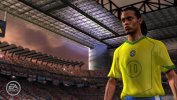
FIFA 06: Road To FIFA World Cup is finally working with audio without crashing. Played a full match with audio with minimal visual bugs.

Took more than 13 years since Xenia first became a thing and it's been over 20 years since the game has been released. It was a long wait but finally the game is running on PC without crashing or significant issue.

You have to download this build of Xenia canary from here: https://github.com/xenia-canary/xenia-canary/actions/runs/26235088799

Direct link of the build (Windows): Windows build
Direct link of the build (Linux): Linux build


Gameplay footage of Xenia running on my pc (Video is still processing):

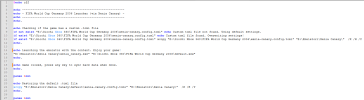
Settings to be changed in Xenia-canary.config.toml (Open with notepad):
readback_resolve = "fast" [Otherwise the game's lighting will be completely broken]
draw_resolution_scale_x = 1 [Rendering the game in higher resolution breaks the lighting unfortunately]
draw_resolution_scale_y = 1

Some bugs I noticed:
-Random post process glitch in cutscenes: rare but the colors glitches out for few seconds.
-Random artifacts during cutscenes: rare.
-Stadium lights bleed through the player models: Most noticeable on dusk and night matches. Looks wrong but in most cutscenes the camera angles wont be in such situation.
-Cloth and hair physics randomly stops working at times: no idea why it happens or if it's a problem with the game itself.
-Audio has some double playback effect randomly, especially noticeable with commentary.


I haven't tested FIFA world Cup 2006 yet but this build of Xenia might work with that game as well and UCL 06-07.

Edit: FIFA World Cup 2006 is playable too. Footage below:
 
Last edited:
Awesome, been many years to wait but we're finally seeing progress in the accuracy of emulating this rare piece.

The fact these 2 were 360 exclusive but very pioneering in the first next gen football games is very important to preserve and appreciate.

Hopefully some improvement on UCL 06/07 and FIFA 07 as the missing exclusive football games soon!
 
Awesome, been many years to wait but we're finally seeing progress in the accuracy of emulating this rare piece.

The fact these 2 were 360 exclusive but very pioneering in the first next gen football games is very important to preserve and appreciate.

Hopefully some improvement on UCL 06/07 and FIFA 07 as the missing exclusive football games soon!
Now that the game is playable, what we need are modding tools. Its fairly easy to extract all the files in these two games. The only thing left is for someone to make tools that can read the .rx2 files. Finally we can add clubs and other national teams in RTWC 06 and do some modifications to the gameplay. And probably fix some of the issues that were limited to next gen versions.
 
I don’t actually have fond memories of those games, what’s the reason for the desire to get them working? All I can remember was being blown away by how great the game looked in gameplay cam, but not the actually gameplay.
 
FIFA 06: Road To FIFA World Cup is finally working with audio without crashing. Played a full match with audio with minimal visual bugs.

Took more than 13 years since Xenia first became a thing and it's been over 20 years since the game has been released. It was a long wait but finally the game is running on PC without crashing or significant issue.

You have to download this build of Xenia canary from here: https://github.com/xenia-canary/xenia-canary/actions/runs/26235088799

Direct link of the build (Windows): Windows build
Direct link of the build (Linux): Linux build


Gameplay footage of Xenia running on my pc (Video is still processing):

Settings to be changed in Xenia-canary.config.toml (Open with notepad):
readback_resolve = "fast" [Otherwise the game's lighting will be completely broken]
draw_resolution_scale_x = 1 [Rendering the game in higher resolution breaks the lighting unfortunately]
draw_resolution_scale_y = 1

Some bugs I noticed:
-Random post process glitch in cutscenes: rare but the colors glitches out for few seconds.
-Random artifacts during cutscenes: rare.
-Stadium lights bleed through the player models: Most noticeable on dusk and night matches. Looks wrong but in most cutscenes the camera angles wont be in such situation.
-Cloth and hair physics randomly stops working at times: no idea why it happens or if it's a problem with the game itself.
-Audio has some double playback effect randomly, especially noticeable with commentary.


I haven't tested FIFA world Cup 2006 yet but this build of Xenia might work with that game as well and UCL 06-07.

Edit: FIFA World Cup 2006 is playable too. Footage below:

AMAZING !!!!!
 
Now that the game is playable, what we need are modding tools. Its fairly easy to extract all the files in these two games. The only thing left is for someone to make tools that can read the .rx2 files. Finally we can add clubs and other national teams in RTWC 06 and do some modifications to the gameplay. And probably fix some of the issues that were limited to next gen versions.
One thing I was surprised by is that I couldn't sim a COM v COM match in a friendly, or that you can't turn the HUD off in a match. Was a bit disappointed by that.

I don’t actually have fond memories of those games, what’s the reason for the desire to get them working? All I can remember was being blown away by how great the game looked in gameplay cam, but not the actually gameplay.
Mostly because of preservation and accessibility, RTWC was the first next gen football game even if it was limited, it's a part of football gaming history.

Being a kid and seeing these screenshots in 2005 before the 360 released was mind blowing. Going from PS2 PES and FIFA to this fidelity was so exciting.

R.jpgfifa06x360-25_1050731.jpg
 
I don’t actually have fond memories of those games, what’s the reason for the desire to get them working? All I can remember was being blown away by how great the game looked in gameplay cam, but not the actually gameplay.
RTWC 06 was kinda mess but WC 06 was a decent game. It was the world cup version of FIFA 06 basically, which was and still is a decent game. The 360 version of the game had the best visuals and many people back in the day were disappointed for getting a shitty pc port. The PC port wasn't even on par with the og xbox version because of missing visual effects.

As for RTWC 06, it's one of the best looking FIFA games out there in terms of art style. So some people are interested in getting this game to work outside of a x360.

And last but not the least, these reasons do not matter. This thread was made for the sole purpose of playing the next gen versions of FIFA games on PC which PC players got screwed over by EA and to preserve the said next gen versions via emulation- because these consoles are no longer in production anymore.
 
FIFA 06: Road To FIFA World Cup is finally working with audio without crashing. Played a full match with audio with minimal visual bugs.

Took more than 13 years since Xenia first became a thing and it's been over 20 years since the game has been released. It was a long wait but finally the game is running on PC without crashing or significant issue.

You have to download this build of Xenia canary from here: https://github.com/xenia-canary/xenia-canary/actions/runs/26235088799

Direct link of the build (Windows): Windows build
Direct link of the build (Linux): Linux build


Gameplay footage of Xenia running on my pc (Video is still processing):

Settings to be changed in Xenia-canary.config.toml (Open with notepad):
readback_resolve = "fast" [Otherwise the game's lighting will be completely broken]
draw_resolution_scale_x = 1 [Rendering the game in higher resolution breaks the lighting unfortunately]
draw_resolution_scale_y = 1

Some bugs I noticed:
-Random post process glitch in cutscenes: rare but the colors glitches out for few seconds.
-Random artifacts during cutscenes: rare.
-Stadium lights bleed through the player models: Most noticeable on dusk and night matches. Looks wrong but in most cutscenes the camera angles wont be in such situation.
-Cloth and hair physics randomly stops working at times: no idea why it happens or if it's a problem with the game itself.
-Audio has some double playback effect randomly, especially noticeable with commentary.


I haven't tested FIFA world Cup 2006 yet but this build of Xenia might work with that game as well and UCL 06-07.

Edit: FIFA World Cup 2006 is playable too. Footage below:

The latest build of Xenia Edge is practically flawless. You can run it at 2x resolution with no audio bugs, and the brand-new UI looks fantastic. Right now, it's definitely the most polished Xbox 360 emulator available.
 

Attachments

  • bandicam 2026-05-23 23-12-35-377(1).jpg
    bandicam 2026-05-23 23-12-35-377(1).jpg
    48.4 KB · Views: 0
The latest build of Xenia Edge is practically flawless. You can run it at 2x resolution with no audio bugs, and the brand-new UI looks fantastic. Right now, it's definitely the most polished Xbox 360 emulator available.
Wait, the game is not crashing on latest build of Xenia edge? 2x res is causing the lighting to go dark/ full black here. I will keep testing.
 
The latest build of Xenia Edge is practically flawless. You can run it at 2x resolution with no audio bugs, and the brand-new UI looks fantastic. Right now, it's definitely the most polished Xbox 360 emulator available.
Is there a way to have per-game settings (like we can do for example with RPCS3)?
Otherwise, is there a way to launch Xenia via command line? This way we could create a .bat that loads the correct settings (by copying the relevant .toml file in the "default" location) for each game annd then invokes Xenia with the path to the ISO to make it run.
I do something similar already with different patches for of PES 2021 (bat files handle the files in "My Documents" then launch Sider in the relevant folder, then Sider lauches the game) so it could be an interesting solution also for Xenia.

EDIT: apparently it can be done! 🤩
So, expanding the cmd file by adding copy commands for the .toml before starting Xenia should be possible also.
 
Last edited:
RTWC 06 was kinda mess but WC 06 was a decent game. It was the world cup version of FIFA 06 basically, which was and still is a decent game. The 360 version of the game had the best visuals and many people back in the day were disappointed for getting a shitty pc port. The PC port wasn't even on par with the og xbox version because of missing visual effects.

As for RTWC 06, it's one of the best looking FIFA games out there in terms of art style. So some people are interested in getting this game to work outside of a x360.

And last but not the least, these reasons do not matter. This thread was made for the sole purpose of playing the next gen versions of FIFA games on PC which PC players got screwed over by EA and to preserve the said next gen versions via emulation- because these consoles are no longer in production anymore.
Yep I complete agree those reasons don’t matter, I was just curious. A part of me was hoping that someone had created gameplay mods that make it fun, I just remember I had zero confidence in knowing the outcome of a pass or shot 😅

Appreciate the responses from yourself and @Marlon Anthony 👍
 
One thing I was surprised by is that I couldn't sim a COM v COM match in a friendly, or that you can't turn the HUD off in a match. Was a bit disappointed by that.
Yeah, this is absurd. Hopefully someone manages to mod it and allow com vs com matches. On the old gen versions you can do that.
 
Yep Xenia Edge is working with RTWC 06 as well. Unfortunately it seems like running the game at 2x or 3x resolution scale with readback_resolve= fast makes my 5070 Ti shit it's pants. Can't maintain locked 60 fps in cutscenes and it drops to 30s-40s in framerate.
 
As for RTWC 06, it's one of the best looking FIFA games out there in terms of art style. So some people are interested in getting this game to work outside of a x360.
Yeah I agree, this game looked better than any next gen FIFA until about FIFA 15 in terms of accuracy and fidelity. FIFA 07 looked horrible compared to 06 RTWC.

Then the FIFA games has this ongoing curse of player models who looked like ogres and stretched out kits and player names. So frustrating.
 
Yeah I agree, this game looked better than any next gen FIFA until about FIFA 15 in terms of accuracy and fidelity. FIFA 07 looked horrible compared to 06 RTWC.

Then the FIFA games has this ongoing curse of player models who looked like ogres and stretched out kits and player names. So frustrating.
Oh God, the way the player models look stretched like Slender man on FIFA 15 is abysmal. The body physic itself did not look bad. I loved how the upper arm and chest muscles could be seen through the kits. It's just that the body was too long and the limbs were stretched to oblivion.

There are some body model mods that port the models from newer FIFA games onto FIFA 15. But all of those have the same long limb issue. I think if anyone manages to just modify the base FIFA 15 body model and adjust the body and limb heights, it will look best cause the core design of the model looks great.


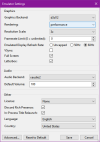
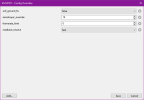
Managed to run FIFA 06: RTWC at 4k without significant performance drops on Xenia Edge. These are the settings I used-

General emulator settings:
1779556466864.png

Game config overrides:
1779556489075.png

Rendering was set to Accurate instead of Performance which caused the framerate to drop to hell and GPU usage went to 97% on cutscenes. However, there are still some drops here and there on cutscenes on my 5070 Ti but it definitely looks a lot smoother than actual X360 hardwre.

Running the game on 4k just shows how good the game actually looks. The visual quality is unmatched. The gameplay logic seems to be same as ps2 FIFA games. Hopefully someone can manage to port over the FIFA 07/08 pc/ps2 gameplay AI over to this.

Another important modification we need for this game is to fix the color grading/LUT of the night matches. EA being EA changed something before the final build and the color grading is completely washed out on night matches. If you see the earlier developmental screenshots of the game or even the trailers/ intro video you will see that the black levels and saturation looks a lot better on night matches.

Is there a way to have per-game settings (like we can do for example with RPCS3)?
Otherwise, is there a way to launch Xenia via command line? This way we could create a .bat that loads the correct settings (by copying the relevant .toml file in the "default" location) for each game annd then invokes Xenia with the path to the ISO to make it run.
I do something similar already with different patches for of PES 2021 (bat files handle the files in "My Documents" then launch Sider in the relevant folder, then Sider lauches the game) so it could be an interesting solution also for Xenia.

EDIT: apparently it can be done! 🤩
So, expanding the cmd file by adding copy commands for the .toml before starting Xenia should be possible also.

Xenia Edge allows for per game config.

Link for Xenia Edge build I used: Windows version and Linux version


As for World Cup 2006, unfortunately like FIFA 08 the crowd disappears when forcing the game to run at higher resolutions:

1779557205700.png
 
Last edited:
Tested FIFA 07, unfortunately this game is still a crashfest with this build. I managed to get in a match twice but after that it crashed everytime I tried to start a match.
1779564967682.png
 
Yep I complete agree those reasons don’t matter, I was just curious. A part of me was hoping that someone had created gameplay mods that make it fun, I just remember I had zero confidence in knowing the outcome of a pass or shot 😅

Appreciate the responses from yourself and @Marlon Anthony 👍
Anybody try to change gameplay using quickbms extract files? I want more dribbling CPU players and higher difficulty.
 
Wow that looks crisp @Sami 1999 never thought I'd see this game in such a high resolution after years of crossing my fingers and testing on each new Xenia until giving up
Yeah, it's been so long. I never thought this day would come. The game looks and runs so well compared to real hardware.
 
Apparently Xenia Edge gives me a lot of stuttering, I tried to fiddle with the settings but I haven't been able to solve it yet.
So, Canary it is! It still lags/stutters a little with the 2006 World Cup game (the only one I already tried with this version), but it behaves better than Edge.
I'll have to temporarily make do without audio but hey, I'll survive.
And as for the custom game config... Well, back to doing everything within the bat!
1779692109450.png
 
Back
Top Bottom