XBox 360 Recompilations

Excellent - I’m glad it’s working for you. Those videos look great.

The game had a predefined upper memory limit to avoid crashes, which was necessary to increase to permit 4K and 8K resolutions. It’s possible you are hitting a new upper software memory limit on cutscenes. I don’t have the hardware you do, so it’s difficult for me to validate, but I can mess around with a few things so you can try.

I suspect but have not validated that replacement assets would be similar to FIFA 16, given that it’s the same engine, so utilizing Harry Balzak’s latest mod or the classic patch with this game may be feasible.

I see. I will gladly test out things for you if it helps you with the project. The memory thing might be true since my cpu and gpu usage remain low despite the fps drops.

A lot of these assets are interchangeable on all ignite engine games. However, FIFA 15 seems to be closure to FIFA 14 than FIFA, especially with the face models. FIFA 16 face models are not compatible with 15 and 14ng unless you convert them with something like tokke001's FIFA converter and even then the hairs and eyes do not scale correctly. FIFA Online 4 on the other hand seems to scale better with FIFA 16 from my experience.

Being that said, the game crashed when I straight up tried to put camera.dat from fifa 15 to fifa 14. Gotta check again. Maybe it's not worth trying to directly get new camera options in the game and instead it would be better to just replace camera values from one of the existing ones to match that of dynamic cam.
 
Have to join the chorus. Incredible job man, you are something else. Hats off!

Dynamic camera seems to be missing from this game though. In future, I'd like to mess with the camera values to see if I can match dynamic camera zoom. Porting the FIFA 15 camera.dat files might work, will fiddle with that.
Yeah, dynamic camera (which is incidentally my favourite and go to one) is absent from both 1.00 of Ps3 and Ps4 versions... although they added it back in the updated ones.

If you or Sleevel manage to port it in, this would be by far the superior version for me, but with this kind of smoothness and pc possibilities, I think at this pace it will probably become so very soon regardless, if it isn't anyway...
 
I installed 1.63 update and dynamic camera is still missing.
I 100% guarantee you that the latest Ps4 update (have no idea which it is, I guess 1.06?) does have dynamic camera. Or perhaps you were just experimenting with in between patches?
 
Last edited:
I don't think the patch installed correctly at all. Shadps4 and pkg extractor reports the game being 1.63 now, but I see absolutely no change in the game. I dont see the world cup kick off mode, world cup stadiums, or dynamic cam or anything that was mentioned in the patch notes for that matter.

What a pain in the ass.
 
I have no information but it may be a DLC? There’s information on how users have added Bloodborne DLCs. Might be worth a try.
 
[Debug] <Critical> (Game:Main) signals.cpp:148 SignalHandler: Unhandled Exception code 0xc0000005 at 0x7a36581

why am i getting this error code?
 
I follow all the steps, but when I boot the game it crashes at the start screen. Any suggestion?

Anyway, what a truly remarkable effort you put, @sleevel!
 
@Sami 1999 , try this exe and add this line to your config.json. It increases the memory pool to 3.75GB. I expect it will result in higher framerates on the replays. If you're still seeing software slowdowns, there may be other workarounds that require a bit more trial and error.

"fifa14_graphics_pool_mib": 3840,

https://www.mediafire.com/file/ypaskjv1hddv8jr/shadps4.exe/file

It hasn't improved the framerate much. I wasn't able to maintain locked 120 FPS and cpu gpu usage remained fairly low. I have to do further testing to see if it did improve the framerates. One thing I did notice though is that rain animations were glitching out, idk if I haven't noticed it before or it happens after increasing the memory pool, have to compare it again. edit: rain animations glitching out at the start of a match happens regardless of memory pool setting.

I made another discovery. You don't necessesarily have to lock framerate to 60 or multiple of 60 [like 120 or 240] to prevent stutters during cutscene and replay camera panning. It seems like the game wants you to maintain locked framerate equivalent to your vblank value. So when I set my vblank value to 160hz, and when I'm able to maintain locked 160 fps on certain scenes- the camera panning is completely smooth. In such scenarios- dropping to even 120 fps or capping it to 120 fps via external framerate limiter with gsync enabled [to avoid fps to refresh rate mismatch stutter] still resulted in camera panning stutter. Then I realized it's not just cutscenes, its during gameplay too. The game expects you to maintain locked consistent framerate equivalent to vblank setting or it will stutter.

I have no information but it may be a DLC? There’s information on how users have added Bloodborne DLCs. Might be worth a try.

Yeah, I have been trying to find information regarding this. But found absolutely nothing. Only lead I found was that the game update was the only thing that added these modes and absolutely no mention of any separate DLCs.
 
Last edited:
@Sami 1999 , try this exe and add this line to your config.json. It increases the memory pool to 3.75GB. I expect it will result in higher framerates on the replays. If you're still seeing software slowdowns, there may be other workarounds that require a bit more trial and error.
Prep for Tests

"fifa14_graphics_pool_mib": 3840,

https://www.mediafire.com/file/ypaskjv1hddv8jr/shadps4.exe/file
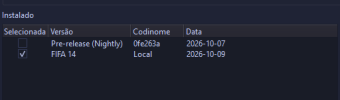
After this part, my game loads, but it doesn't even reach the main menu. I downloaded the version @sleevel posted here, but I installed it directly through the version manager. I used the specific settings from EmulationTV's video and couldn't get it to work either. I tested it without those specific settings and got the same result, and I also tried the config.json provided here. I have no idea why it isn't working, I'm not a dev, and this post is actually a request for anyone to make a YouTube tutorial showing how to get it running, even if the game isn't 100% yet (from what I've seen, it's playable). It's my favorite FIFA, and honestly, with AI advancing and these re-compilations, my dream is for someone to port it to PC with modding support and online play again. Thanks to anyone who can help me! (I also tested no updt 1.0 version of the game) @Marlon Anthony

Captura de tela 2026-10-09 034110.pngCaptura de tela 2026-10-09 040258.png
 
It hasn't improved the framerate much. I wasn't able to maintain locked 120 FPS and cpu gpu usage remained fairly low. I have to do further testing to see if it did improve the framerates. One thing I did notice though is that rain animations were glitching out, idk if I haven't noticed it before or it happens after increasing the memory pool, have to compare it again. edit: rain animations glitching out at the start of a match happens regardless of memory pool setting.

I made another discovery. You don't necessesarily have to lock framerate to 60 or multiple of 60 [like 120 or 240] to prevent stutters during cutscene and replay camera panning. It seems like the game wants you to maintain locked framerate equivalent to your vblank value. So when I set my vblank value to 160hz, and when I'm able to maintain locked 160 fps on certain scenes- the camera panning is completely smooth. In such scenarios- dropping to even 120 fps or capping it to 120 fps via external framerate limiter with gsync enabled [to avoid fps to refresh rate mismatch stutter] still resulted in camera panning stutter. Then I realized it's not just cutscenes, its during gameplay too. The game expects you to maintain locked consistent framerate equivalent to vblank setting or it will stutter.


Yeah, I have been trying to find information regarding this. But found absolutely nothing. Only lead I found was that the game update was the only thing that added these modes and absolutely no mention of any separate DLCs.
Can you share a video of the rain glitch? I tried a rain game and didn't notice anything unusual.
 
[Debug] <Critical> (Game:Main) signals.cpp:148 SignalHandler: Unhandled Exception code 0xc0000005 at 0x7a36581

why am i getting this error code? please help me what should i do to get into the game?
 
Can you share a video of the rain glitch? I tried a rain game and didn't notice anything unusual.
I will try to. You will see this most on santiago bernabeu stadium on night+ rain weather at the start of a match when the camera is outside of the stadium. This does not always occur, and doesn't occur in the same exact way either.

Glitch 1: The rain animations cuts and loops erratically and goes in and out of visibility.
Glitch 2: The rain particles look super thin.

This usually lasts only for few seconds or goes away once the camera switches to another scene. Not a huge issue but something there nonetheless. It's hard to record because the camera angle doesn't go outside of the stadium on every match and restarting the match results in crash here. So I have to go back to main menu and repeat the process. I will get footage of it when I encounter it again.


There are also other minor glitches like the EA sports logo and scoreboard in particular [but happens with any HUD element actually] stretches out abnormally. Sometimes the referee or player socks textures also ends up with a fully white/ corrupted look which goes away if you pause and unpause the game. And then there are the vertex explosions that randomly appear. There's also the lights passing through player models.

But overall, the game looks very stable now for the most part.
 
I have recompilations of FIFA 06 RTWC, 07, 08, 09, 10 and World Cup 2010. In the simplest terms, these are all Xenia emulations simply with pre-compiled code. Where it becomes something different is when something different than a standard Xenia launch happens.

For example, the FIFA 07 match load crash bug. The workaround of disabling processors works but the root cause of the issue appears to be redundant textures loaded by a single worker causing a memory overload, so modifying the code to load them properly results in the standalone FIFA 07 recomp loading without needing to disable one of the processors.

In each recompilation, some sort of graphical issue has emerged which must be fixed. I was able to successfully get partial integer scaling to work 1600x1000 and 1920x1200 on my NHL Legacy recomp as well as some Vulkan optimizations which significantly increases FPS without sacrificing graphical quality. I messed around with building a native renderer for NHL Legacy but it had many of its own issues and integration into what is otherwise a Xenos game engine is more than a little challenging (a completely native game remains possible but is a monumental undertaking - until you get there, it’s still some degree of emulation, albeit extremely game specific). I’ve made the most progress here.

I messed around quite a bit with improving the renderer pathway in FIFA 08, to maximize FPS and create/allow 144 Hz presentation, where I’ve made great strides.

So yeah, I’ve certainly made progress - there’s an enormous amount of untapped potential for improving performance of XBox 360 games. Working on the FIFAs is not particularly compelling to me right now - they are good games, and in the context for when they were made, graphically astounding, but not something I feel like pouring a lot of time into at the moment.
Are there any plans to port *FIFA 14 World Cup*? Since it was the final official World Cup title, I believe many players are looking forward to it; porting it to PC would be a tremendous contribution.
 
Are there any plans to port *FIFA 14 World Cup*? Since it was the final official World Cup title, I believe many players are looking forward to it; porting it to PC would be a tremendous contribution.
Personally no, but I’m sure someone will or already has done this. If you’re interested in doing so, check out the first message in this thread. I would be happy to provide a few tips - one big one is that ReXglue recompiles the entire game after every changed function. Instead, use ReXglue to recompile the game once and then make surgical repairs to only affected code sections when bugs or unlinked functions are discovered. There will likely be thousands, so you can save a significant amount of unnecessary recompilation time.
 
It’s also pretty wild that a) there are now PS5 recompilations and b) these happened before PS3. He explains in the video but the PS3 is a very unique machine that people are still trying to figure out.

 
[Debug] <Critical> (Game:Main) signals.cpp:148 SignalHandler: Unhandled Exception code 0xc0000005 at 0x7a36581

why am i getting this error code? please help me what should i do to get into the game?

I also have a similar error at startup (adter choosing language it lets me press "X" then loads for a while and then crashes):

[Render.Vulkan] <Info> (shadPS4:GpuCommandProcessor) vk_pipeline_cache.cpp:349 GetGraphicsPipeline: Compiling graphics pipeline 0xa5a0d7df1d3622b0
[Debug] <Critical> (shadPS4:GpuCommandProcessor) signals.cpp:145 SignalHandler: Unhandled Exception code 0xc0000005 at 0x7ffb78d4e810
[Lib.NpParty] <Error> (ff_FEThread) np_party.cpp:13 sceNpPartyCheckCallback: (STUBBED) called

I actually can't tell why it happens, I'm fiddling with the options but to no avail for the moment.
 
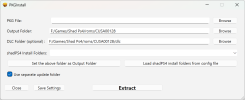
I managed to install the world cup dlc update for fifa 14 ps4 correctly this time. But it seems like shadps4 simply doesn't like the update and crashes. This not only includes the custom shadps4 builds but also nightly builds and regular shadps4 builds unfortunately. Will require further testing. World cup kits would be nice to have.
 
I managed to install the world cup dlc update for fifa 14 ps4 correctly this time. But it seems like shadps4 simply doesn't like the update and crashes. This not only includes the custom shadps4 builds but also nightly builds and regular shadps4 builds unfortunately. Will require further testing. World cup kits would be nice to have.
Can you explain how you did this?
 
1791985936683.png

Output folder: root dir of fifa 14
DLC dolder has to be specifically set to rootdir of fifa 14/dlc folder, otherwise the title update does nothing to the game.

Used PKGInstaller
 
The PKG from Sony’s official website? When I tried to extract the file (which was a gig or two) with PKG Manager it only extracted a few MB.
 
我使用 ReXGlue 发布了一个实验性的 FIFA Street (2012) PC 重制版。

大家好,

我想分享我的项目:使用ReXGlue构建的FIFA Street (2012) Xbox 360 版本的 Windows PC 重编译版。

我制作了一个图形安装程序和一个专用启动器,其中包含显示、图形和兼容性设置。您可以选择自己的游戏 ISO 文件,安装程序会提取文件并在本地重新编译游戏。

我在人工智能的辅助下开发了这个项目,其中包括 ChatGPT 和 OpenAI Codex。我使用这些工具进行编码、调试、构建脚本、安装程序、启动器和文档编写,同时指导项目进展并在我的电脑上进行测试。

这很大程度上要归功于ReXGlue 和 Xenia 的贡献者们,他们为底层工具和运行时环境做出了贡献,值得赞扬。

游戏的 PowerPC 代码会预先重新编译,而 ReXGlue 则提供运行时环境以及 Xbox 360 的图形和系统服务。这并非完全重写的游戏引擎,也不是替代原生渲染器。

我在项目页面上上传了截图和电脑上的游戏录像。第一个实验版本现已发布。

不包含 ISO 或原版游戏文件。您需要自行准备游戏文件。

来源、安装程序、屏幕截图和游戏视频:

https://github.com/samuelitodavila/fifa-street-pc

我很想听听您的反馈!如果您尝试了,欢迎在 GitHub 上分享您的体验或报告问题。

谢谢浏览!
你们有计划移植FIFA 14世界杯游戏吗?我认为它是一款令人难忘的作品;如果能把它移植到PC平台,在我看来,将会带来无与伦比的游戏体验。
I’ve released an experimental FIFA Street (2012) PC recompilation using ReXGlue

Hi everyone,

I’d like to share my project: a Windows PC recompilation of the Xbox 360 version of FIFA Street (2012), built using ReXGlue.

I’ve put together a graphical installer and a dedicated launcher with display, graphics and compatibility settings. You select your own game ISO, and the installer extracts the files and recompiles the game locally.

I developed this project with AI assistance, including ChatGPT and OpenAI Codex. I used these tools for coding, debugging, build scripts, the installer, launcher and documentation, while directing the project and testing it on my PC.

Much of this is possible thanks to the work of the ReXGlue and Xenia contributors, who deserve credit for the underlying tools and runtime.

The game’s PowerPC code is recompiled ahead of time, while ReXGlue provides the runtime and Xbox 360 graphics and system services. This isn’t a fully rewritten game engine or a replacement native renderer.

I’ve included screenshots and a gameplay recording from my PC on the project page. The first experimental release is now available.

No ISO or original game files are included. You need to provide your own copy.

Source, installer, screenshots and gameplay video:

https://github.com/samuelitodavila/fifa-street-pc

I’d love to hear your feedback! If you try it, feel free to share your experience or report issues on GitHub.

Thanks for taking a look!
Do you have any plans to port the FIFA 14 World Cup game? I consider it an unforgettable title; bringing it to PC would, in my opinion, offer an unparalleled experience. Thanks.
 
I can't make it run either. If anyone is willing to share the config used, It will be highly appreciated it.


[Kernel.Vmm] <Info> (Game:Main) memory.cpp:88 sceKernelAllocateDirectMemory: searchStart = 0x0, searchEnd = 0x120000000, len = 0xc8000000, alignment = 0x200000, memoryType = 0x0, physAddrOut = 0x400000
[Kernel.Vmm] <Info> (Game:Main) memory.cpp:203 sceKernelMapNamedDirectMemory: in_addr = 0x70000000000, len = 0xc8000000, prot = 0x3, flags = 0x0, phys_addr = 0x400000, alignment = 0x200000, name = 'anon'
[Kernel.Vmm] <Error> (Game:Main) memory.cpp:1525 SearchFree: addr = 0x70000000000 is outside the memory map
[Kernel.Vmm] <Info> (Game:Main) memory.cpp:255 sceKernelMapNamedDirectMemory: out_addr = 0x70000000000
[Debug] <Critical> (Game:Main) signals.cpp:148 SignalHandler: Unhandled Exception code 0xc0000005 at 0x7b9beb1
[Render] <Info> (Game:Main) cache_storage.cpp:137 Close: Cache dumped
[Loader] <Info> (Game:Main) emulator.cpp:928 UpdatePlayTime: Playing time for CUSA00128: 0:00:00 1792198582
 
probably an emulator bug, cuz its also present on rpcs3

After the first match in a session of Captain Your Country or FIFA World Cup Tournament mode the HUD will fail to render beginning in the practice arena right before the start of a match, which reoccurs every other match afterwards. Another side effect of this rendering bug is that if a penalty is awarded, the emulation will crash. The only known temporary solution at the moment is to exit out of the respective mode you are running and reenter it, resetting the HUD.
- from wiki.rpcs3

btw, u can also check *aLe thread on soccergaming:
https://soccergaming.com/forums/threads/2010-fifa-world-cup-enhanced-edition.6476334/
he fixed and added tons of kits and i added a lot of missing faces for this game
The bug you mentioned doesn't show up on the Android Xbox 360 emulator, I've tested it. But it does happen on PC's Xenia Edge, so I don't think it's a hard issue to fix.
 
你们有计划移植FIFA 14世界杯游戏吗?我认为它是一款令人难忘的作品;如果能把它移植到PC平台,在我看来,将会带来无与伦比的游戏体验。

Do you have any plans to port the FIFA 14 World Cup game? I consider it an unforgettable title; bringing it to PC would, in my opinion, offer an unparalleled experience. Thanks.
Looks like its finally here:
 
Back
Top Bottom